Apple Watch Charger:Guide to Choosing, Using,Understand Right
introduction
An Apple Watch Charger is an essential accessory for keeping an Apple Watch powered throughout the day. Unlike many smartphones and other electronic devices, Apple Watch models use a dedicated magnetic charging system that attaches to the back of the watch. This magnetic connection makes charging simple, while newer charging cables can also provide faster charging on compatible models.
With different Apple Watch generations, charging cables, USB-C adapters, magnetic chargers, docks, and third-party accessories available, choosing the right charger can sometimes be confusing. This guide explains how Apple Watch charging works, which charger types are available, what fast charging means, how to choose a suitable charger, and what to look for when buying one.
What Is an Apple Watch Charger?
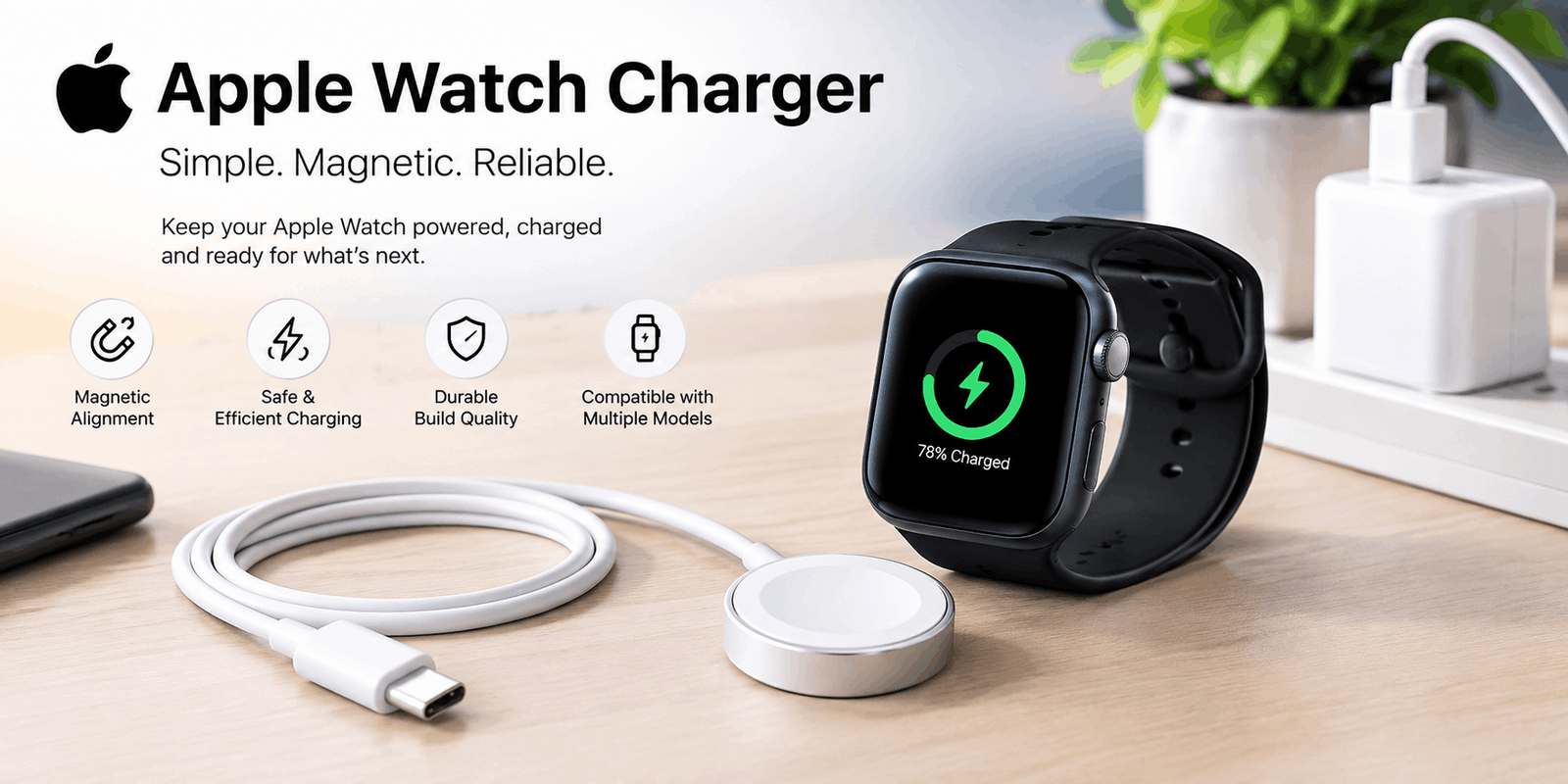
An Apple Watch Charger is a charging accessory designed specifically to transfer power to an Apple Watch battery. The standard Apple Watch charging system uses a magnetic charging puck that automatically aligns with the back of the watch.
When the charger is placed against the rear of the Apple Watch, its magnets help position the connector correctly. Once charging begins, a charging symbol appears on the watch display.
The charger itself normally needs to be connected to a power source, such as a USB power adapter, computer, or another compatible USB power outlet.
For everyday users, the magnetic design is one of the most convenient parts of the Apple Watch charging experience because there is no need to insert a physical connector into the watch.
How Does an Apple Watch Charger Work?
Apple Watch charging is based on magnetic alignment and wireless power transfer through the charging puck. The round charging surface sits against the back of the watch, where it transfers energy to the internal battery.
The process is simple:
- Remove the Apple Watch from your wrist.
- Connect the charging cable to a compatible power source.
- Place the back of the watch against the magnetic charging puck.
- Allow the magnets to align the charger.
- Check the display for the charging indicator.
The magnetic system helps position the charger correctly and makes the charging process more convenient than traditional connectors.
This design eliminates the need to plug a cable directly into the watch. It also makes it easier to place the watch on a bedside charger, charging stand, or travel dock.
Types of Apple Watch Chargers
There are several types of Apple Watch charging accessories, and understanding the differences can help you choose the right option.
1. Apple Watch Magnetic Charging Cable
The standard magnetic charging cable is designed for convenient everyday charging. It uses a magnetic puck that attaches to the back of the Apple Watch.
This option is suitable for users who primarily want a reliable charging solution without necessarily needing the fastest possible charging speed.
2. Apple Watch Magnetic Fast Charging USB-C Cable
Newer Apple Watch models can take advantage of fast charging with a compatible magnetic fast charging cable. The cable uses USB-C on the power-source side and a magnetic charging puck on the watch side.
Fast charging is useful for people who frequently need to recharge their watch quickly before leaving home. A short charging session can provide useful additional battery life when there is not enough time for a complete charge.
3. Apple Watch Charging Dock
A charging dock provides a more organized setup than a loose cable. Depending on its design, it can keep the Apple Watch positioned upright or at a convenient viewing angle.
A dock can be useful on a desk or bedside table because it keeps the watch and charging cable organized while making the display easier to see.
4. Multi-Device Charging Stations
Some charging stations are designed to charge an Apple Watch along with other devices such as an iPhone and wireless earbuds.
These products can reduce cable clutter and create a centralized charging area. However, charging performance can vary between products, so compatibility and build quality should be considered before purchasing.
What Is Fast Charging on Apple Watch?
Fast charging allows compatible Apple Watch models to reach useful battery levels more quickly than older charging systems.
Newer Apple Watch models support faster charging when paired with the appropriate magnetic fast charging cable and compatible power adapter.
The actual charging time can vary depending on the Apple Watch model, battery level, temperature, software, power adapter, and whether the watch is being used while charging.
Fast charging is particularly useful for people with busy schedules. For example, if your Apple Watch has a low battery before work or exercise, a short charging session may provide enough power for several hours of use.
What Power Adapter Should You Use?
The charging cable and power adapter work together. Having a fast-charging cable does not automatically mean the watch will charge at its maximum supported speed.
A compatible USB-C Power Delivery adapter is generally the preferred option for fast charging with supported Apple Watch models.
A dedicated USB-C power adapter can also be preferable to charging through a computer, USB hub, or complicated multi-device setup. Charging through some hubs or low-power ports may result in slower charging.
When choosing a power adapter, compatibility is more important than simply selecting the adapter with the highest wattage.
Apple Watch Charger Compatibility
Compatibility is one of the most important things to check before buying a replacement charger.
Older and newer Apple Watch chargers can look very similar, but charging performance may differ. Some newer Apple Watch models support faster charging with newer charging cables, while older models may have different charging capabilities.
If your priority is fast charging, check:
- Your Apple Watch model
- The charging cable type
- The power adapter
- USB-C support
- Power Delivery support
- Regional charging requirements
This is more reliable than simply choosing a charger because it has an attractive design or a high wattage number.
Why a Higher-Wattage Adapter Does Not Always Mean Faster Charging
A common misconception is that a 100W or 140W adapter will automatically charge an Apple Watch much faster than a lower-wattage adapter.
That is not necessarily true.
The Apple Watch and its charging system determine how much power the device can actually use. A high-wattage adapter can provide more available power, but the watch does not simply consume all of that power.
Therefore, compatibility and charging technology are generally more important than buying the highest-wattage adapter available.
For most users, a good-quality compatible USB-C power adapter is more practical than purchasing an extremely powerful charger.
Apple Watch Charger and Battery Health
Charging habits can influence long-term battery performance. Modern Apple Watch software includes charging-management features designed to reduce unnecessary battery aging.
Features such as Optimized Battery Charging can help manage charging patterns and reduce the amount of time the battery spends at a very high charge level.
Temperature is another important consideration. Extremely hot or cold conditions can affect charging speed and battery performance.
For everyday use, keeping the watch and charger in a normal room-temperature environment is a sensible approach.
Users should also avoid covering the watch with thick materials while charging if this causes excessive heat.
How to Choose the Best Apple Watch Charger
Choosing an Apple Watch charger becomes easier when you consider how you actually use your watch.
For Everyday Home Use
A standard magnetic charging cable may be enough. It is simple, portable, and easy to place beside a bed or on a desk.
For Fast Charging
Choose a compatible magnetic fast charging USB-C cable and a suitable USB-C Power Delivery adapter. This is particularly useful for newer Apple Watch models that support fast charging.
For Travel
A compact charging cable is usually easier to carry than a large charging station. If you travel frequently, a durable cable combined with a small USB-C power adapter can help reduce luggage space.
For Desk or Bedside Charging
A charging dock or stand can provide a cleaner setup. It can also make the watch easier to view while charging.
For Multiple Apple Devices
A multi-device charging station may be convenient if you regularly charge an iPhone, Apple Watch, and wireless earbuds in the same location.
Are Third-Party Apple Watch Chargers Safe?
Third-party chargers can be convenient and sometimes less expensive, but quality and certification matter.
Not every inexpensive charger offers the same level of reliability. Poor-quality accessories may result in slow charging, inconsistent charging, excessive heat, or premature cable failure.
When buying a third-party charger, look for:
- Clear manufacturer information
- Proper compatibility information
- Appropriate certification
- Good build quality
- Correct connector type
- Safety protection features
- Reliable customer reviews
- Warranty or replacement support
An extremely cheap charger may not always be the best option if it sacrifices quality or safety.
How to Identify a Genuine Apple Watch Charger
When purchasing a replacement, it is useful to check the physical design, markings, packaging, connector quality, and manufacturer information.
Genuine accessories normally have clear product identification and consistent construction.
Counterfeit products can sometimes look almost identical to genuine accessories, which makes buying from a reputable retailer particularly important.
If the price seems unusually low compared with similar products, users should carefully check the product description and seller information before purchasing.
Common Apple Watch Charging Problems
Sometimes an Apple Watch may not charge even when the charger appears to be connected.
Dirty Charging Surface
Dust or debris between the watch and charging puck can interfere with proper alignment. Cleaning both surfaces carefully can help.
Incorrect Alignment
Although the magnets normally align automatically, an improperly positioned watch may not charge correctly.
Damaged Cable
A damaged cable can cause intermittent charging or prevent charging completely. Check the cable for visible wear, cuts, bends, or exposed wires.
Incompatible Charger
A charger that does not properly support your Apple Watch model may result in poor charging performance.
Weak Power Source
Charging through certain computers, hubs, or overloaded USB accessories may provide less power than a dedicated wall adapter.
Excessive Temperature
Very hot or cold conditions can affect charging speed and may cause charging protection to activate.
Tips for Faster Apple Watch Charging
If your Apple Watch seems to charge slowly, try these practical steps:
- Use the appropriate magnetic charging cable.
- Use a compatible USB-C power adapter.
- Connect the cable directly to a suitable power adapter.
- Avoid overloaded USB hubs.
- Keep the charging surface clean.
- Keep the watch at a comfortable temperature.
- Avoid actively using the watch while charging.
- Use the cable supplied with your current Apple Watch when possible.
If your watch displays a slow-charging warning, the problem may not necessarily be a damaged charger. The power source, cable, adapter, or charging setup may simply not provide the performance required for faster charging.
Apple Watch Charger vs. iPhone Charger
An Apple Watch charger and an iPhone charger are not the same accessory.
An iPhone can use its own charging connection, while Apple Watch uses its dedicated magnetic charging system.
However, the power adapter can often be shared. For example, a compatible USB-C power adapter can provide power to an Apple Watch magnetic charging cable.
This means you do not necessarily need a completely separate wall adapter for every Apple device. The important point is that the charging cable and power source must be compatible.
Apple Watch Charger for Travel
Travel is one situation where choosing the right charger can make a significant difference.
A compact magnetic charging cable takes up very little space and can easily fit inside a laptop bag, backpack, or travel pouch.
For international travel, the power adapter is also important. Users should make sure their adapter supports the electrical standards of the destination country or use an appropriate travel adapter.
A multi-device charging station can also be useful for people who travel with several Apple products, but it is generally larger than a simple charging cable.
How to Keep Your Apple Watch Charger in Good Condition
A charger can last for a long time when handled properly.
Avoid repeatedly bending the cable sharply near the connector. Keep the charging puck clean and store the cable somewhere it will not be crushed or tangled.
When disconnecting the charger, avoid pulling aggressively on the cable. Instead, hold the appropriate connector area.
If you notice exposed wires, significant damage, unusual heating, or inconsistent charging, replacing the charger is safer than continuing to use a damaged accessory.
Is an Apple Watch Charger Worth Buying?
For Apple Watch owners, a reliable charger is an essential accessory rather than an optional extra. A good charger can make daily charging more convenient and, when compatible with the watch, provide faster charging.
The most important factors are compatibility, charging speed, cable quality, certification, portability, and power-adapter support.
For users with newer Apple Watch models, fast charging can be especially useful. For people who simply charge their watch overnight, a standard magnetic charger may already meet their needs.
The best choice therefore depends on the Apple Watch model and the user’s charging routine rather than simply choosing the most expensive accessory.
Conclusion
An Apple Watch Charger is a small but important part of the Apple Watch experience. The magnetic charging system makes connecting the watch simple, while newer magnetic fast-charging cables can provide faster charging on supported models.
When choosing a charger, compatibility should come first. Users should consider their Apple Watch generation, cable type, USB-C power adapter, fast-charging support, certification, and intended use.
Whether you need a simple bedside charger, a travel cable, a charging dock, or a multi-device station, understanding these differences can help you choose a charging setup that is practical and reliable.
The best Apple Watch charger is not necessarily the most expensive or the one with the highest wattage. Instead, it is the charger that properly matches your Apple Watch, provides suitable charging performance, fits your daily routine, and comes from a trustworthy manufacturer.