introduction
Making music no longer requires an expensive computer, complicated software, or years of experience with professional Digital Audio Workstations. Browser-based music tools have made basic composition much more accessible, and Online Sequencer is one of the tools designed around that idea.
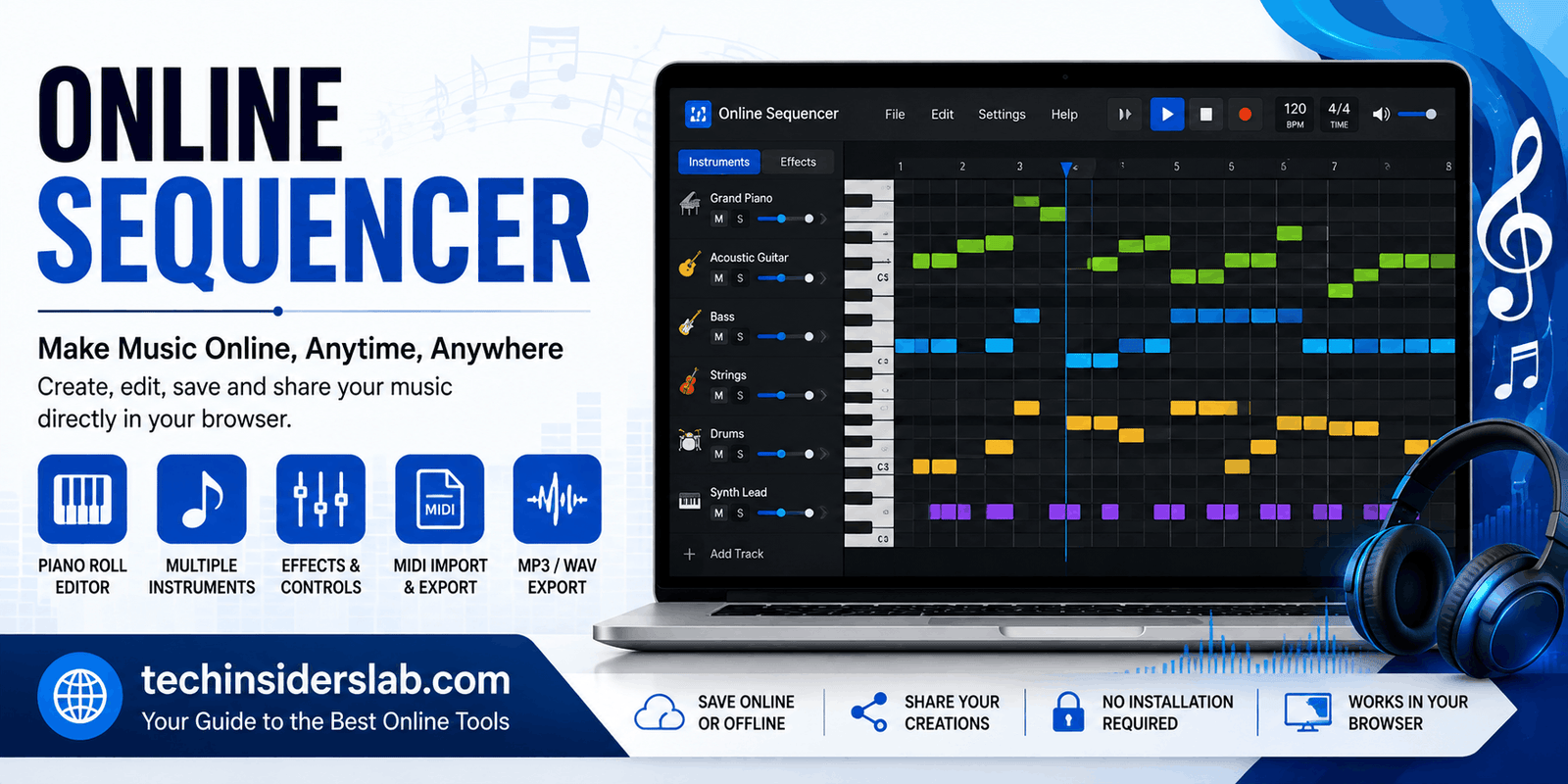
Online Sequencer is a web-based music sequencer that allows users to create tunes directly in a browser, save their work online or offline, and share sequences with other people. Its main workspace uses a piano-roll-style interface where notes can be placed, moved, resized, and arranged to build melodies, chords, bass lines, and other musical patterns.
For beginners, the interface provides a relatively straightforward way to experiment with music. More experienced users can explore instrument settings, effects, MIDI import and export, automation-style features, and other tools for shaping a sequence.
What Is Online Sequencer?
Online Sequencer is an online music creation tool built around a visual piano roll. Instead of installing a traditional music-production application, users can open the website and begin placing notes on a musical grid.
The basic concept is simple: select an instrument, place notes on the timeline, adjust their length and position, and press play to hear the result. The higher a note is positioned on the piano roll, the higher its pitch, while its horizontal position determines when it plays.
The standard editor includes controls for tempo, time signature, grid size, instruments, editing tools, zoom, playback, and exporting. The current feature documentation also lists options such as MIDI import, MP3 export, WAV export, MIDI export, reverse, humanize, fade effects, and stretching.
This makes Online Sequencer useful for people who want to experiment with melodies or arrangements without immediately learning a full professional DAW.
How Does Online Sequencer Work?
The easiest way to understand Online Sequencer is to think of it as a digital music grid.
When you open the editor, you see a piano-roll interface. The vertical position represents musical pitch, while the horizontal position represents time. Clicking on the grid creates a note, and notes can be adjusted after they have been placed.
The default setup uses a 4/4 time signature and a grid that can be changed to different note divisions. Users can drag the end of a note to make it longer or shorter and can use different editing tools to select, erase, copy, or modify notes.
Once several notes have been added, pressing the play control allows you to hear the sequence. This immediate feedback makes the tool useful for testing musical ideas quickly.
Creating Your First Tune
Creating a simple tune does not require advanced music theory.
Start by selecting an instrument such as a piano or another available sound. Then place a few notes on the grid. You can experiment with different pitches and note lengths until you find a melody that sounds good.
After creating the basic melody, additional instruments can be added to provide harmony, bass, rhythm, or other layers. For example, a beginner could start with a piano melody and then add a bass instrument underneath it.
The grid is particularly helpful because it provides a visual representation of timing. If a note appears in the wrong place, it can be moved rather than having to recreate the entire sequence.
Instruments Available in Online Sequencer
One of the most useful aspects of Online Sequencer is its selection of instruments. The current Online Sequencer Wiki lists 58 unique instruments arranged into six categories, with different instruments offering different ranges and sound characteristics.
Available sounds include instruments such as electric piano, grand piano, harpsichord, bass, synthesizers, French horn, trombone, violin, cello, harp, flute, saxophone, organ, strings, and other sounds.
Some instruments are designed for specific musical roles. Piano sounds can work well for melodies and chords, bass instruments can add low-frequency foundations, while synth sounds can be used for electronic compositions.
The instrument selection means users can experiment with different musical styles without needing to record every sound themselves.
Editing Notes and Building Arrangements
Online Sequencer provides several basic editing tools for arranging music. Users can draw notes, select notes, erase them, copy and paste sections, zoom into the timeline, and change grid settings.
The current feature documentation also includes tools such as:
- Invert
- Minor to Major
- Reverse Selection
- Humanize Selection
- Legatomize Selection
- Fade In
- Fade Out
- Stretch Selection
These features can save time when editing a longer sequence.
For example, the humanize feature can be useful when a sequence sounds overly mechanical, while reverse can produce interesting experimental patterns. Stretching can help change the timing of a selected musical section.
Tempo and Time Signature
Tempo is an important part of any musical composition. Online Sequencer includes a BPM control that lets users change how quickly their sequence plays.
According to the current Wiki documentation, the tool supports tempo values from 10 to 999 BPM. It also supports several time signatures, including 2/4, 3/4, 4/4, and 5/4.
Beginners can start with 4/4 because it is familiar in many popular musical styles. Once comfortable with the interface, experimenting with different time signatures can help create more unusual rhythms.
Grid settings are equally important because they determine how precisely notes can be placed. Smaller divisions allow more detailed rhythmic patterns, while larger divisions can make basic composition easier.
Adding Effects to Instruments
Online Sequencer goes beyond simply placing notes. Users can also modify the sound of individual instruments.
The advanced instrument controls include settings such as volume, panning, detune, reverb, distortion, and equalization.
Reverb can make a sound appear more spacious, while panning can position an instrument toward the left or right side of the stereo field. Detuning changes pitch, and distortion can introduce a more aggressive or processed character.
The instrument options also include controls for muting and soloing instruments. This can be useful when working with several layers because users can temporarily isolate one sound to hear how it contributes to the overall arrangement.
Synthesizer Options
For users who want more control over electronic sounds, Online Sequencer provides synthesizer-related options.
The documented synthesizer controls include waveform choices such as sine, square, sawtooth, triangle, and noise. There are also controls related to filters, resonance, LFO settings, and envelope parameters such as attack, decay, sustain, and release.
These features give users more opportunities to experiment with sound design instead of relying entirely on preset instruments.
Someone creating an electronic melody, game-style sound effect, ambient sequence, or experimental composition can use these controls to make a sound more distinctive.
MIDI Import and Export
MIDI support is another important feature for music creators.
The current Online Sequencer interface provides options to import MIDI or sequence files and export compositions as MP3, WAV, or MIDI.
MIDI is especially useful because it stores musical information such as notes, timing, and instrument-related data rather than simply recording the final audio.
This means users can create a sequence in Online Sequencer and then continue working with the MIDI file in compatible music-production software.
MIDI import can also be useful when someone already has a musical idea in MIDI format and wants to inspect or modify it within the Online Sequencer environment.
Exporting Your Music
Once a composition is complete, users have several ways to save or export their work.
The current interface includes options for saving a copy, saving offline, exporting MP3, exporting WAV, and exporting MIDI.
Choosing the appropriate format depends on the intended use.
An MP3 can be convenient for general audio playback and sharing. WAV is useful when higher-quality uncompressed audio is preferred. MIDI is more suitable when the musical notes need to remain editable in another music application.
Saving a copy can also be useful when experimenting with different versions of the same composition.
Online Sequencer for Beginners
Online Sequencer can be a useful learning environment for people who are new to music production.
Instead of facing hundreds of controls found in some professional DAWs, beginners can start with a relatively focused workflow: choose an instrument, place notes, press play, and make changes.
It can also help beginners understand fundamental musical concepts visually. Users can see how pitch changes vertically and how timing changes horizontally.
Over time, they can experiment with chords, scales, rhythm, tempo, different instruments, and effects.
The community resources around Online Sequencer also include a Wiki and forums where users can discuss the tool, music composition, suggestions, collaborations, and other topics.
Online Sequencer for More Advanced Users
Although the interface is approachable for beginners, the platform has features that can appeal to more experienced users.
Advanced users can manipulate instrument settings, apply effects, use editing transformations, work with MIDI, and experiment with synthesizer parameters.
The Wiki also documents browser-console commands that can provide additional control beyond some of the normal interface limits. These features are more technical and are not necessary for basic music creation, but they demonstrate that the platform can be explored beyond its simplest workflow.
This combination makes the tool interesting for experimentation, quick composition, musical sketches, and unusual sound design.
Can You Use Online Sequencer on Mobile?
Device compatibility is an important consideration.
The Online Sequencer Wiki states that the interface is designed primarily for desktop use and that Chrome and other Chromium-based browsers are supported, along with Firefox. It also notes limitations for mobile editing and that iOS browsers have additional restrictions because of Apple’s WebKit requirements.
This means users who want the full editing experience should generally consider using a supported desktop browser rather than relying on a smartphone.
Mobile devices may still be useful for playback or browsing certain areas of the site, but the complete composition workflow is better suited to a desktop environment.
Is Online Sequencer a DAW?
Online Sequencer has some features associated with digital audio workstations, but it is better understood as a browser-based music sequencer rather than a complete replacement for every professional DAW.
Traditional DAWs can provide extensive recording, mixing, mastering, plugin, automation, routing, and production capabilities. Online Sequencer focuses more directly on arranging notes and creating sequences through its piano-roll interface.
For quick musical ideas, MIDI-oriented composition, experimentation, and learning, this focused approach can actually be an advantage.
Who Should Use Online Sequencer?
Online Sequencer can be useful for several types of users.
Beginners can use it to learn basic music composition and understand how notes and timing work.
Music students can experiment with melodies, chords, rhythm, and arrangements.
Game developers may find a browser-based sequencer useful for sketching simple musical ideas.
Content creators can use it to experiment with musical patterns before moving them into another production environment.
Experienced musicians may use it as a quick way to test an idea without opening a large professional DAW.
Its biggest advantage is convenience: users can open the browser and start experimenting without setting up a complicated production environment.
Advantages and Limitations
Like any online music tool, Online Sequencer has both strengths and limitations.
Advantages
- Works directly in a web browser
- Visual piano-roll interface
- Multiple instruments and sound options
- Tempo and grid controls
- MIDI import and export
- MP3 and WAV export
- Instrument effects and advanced settings
- Editing and transformation tools
- Online sharing and community features
- Useful for beginners and experimentation
These capabilities are documented by the current Online Sequencer website and Wiki.
Limitations
The platform is not designed to replace every feature of a professional DAW. Users looking for advanced recording, professional mixing workflows, extensive plugin ecosystems, or sophisticated studio production may eventually need dedicated music-production software.
Browser and device compatibility can also affect the experience, particularly on mobile and iOS devices.
Bilkul, article ke end mein ye short Conclusion + 5 FAQs add kar dein:
Conclusion
Online Sequencer is a convenient browser-based tool for creating music without installing complicated music-production software. Its piano-roll editor, multiple instruments, MIDI support, audio export options, effects, and editing features make it useful for both beginners and experienced creators.
Whether you want to learn basic music composition, create a quick melody, experiment with sounds, or develop a musical idea, Online Sequencer provides an accessible place to get started. While it may not replace a professional DAW for advanced studio production, its simplicity and browser-based workflow make it a practical music creation tool.