Proxy vs VPN: What’s the Difference ,Which One Should You Use?
introduction
The internet makes it easy to access information, communicate with others, work remotely, and use online services from almost anywhere. At the same time, online privacy and security have become increasingly important. Your internet connection can expose information such as your IP address, while unsecured networks can create additional risks when sensitive data is transmitted.
Two technologies frequently discussed in this area are proxies and VPNs. Both can act as intermediaries between your device and the internet, and both can make a website see a different IP address. However, they are not identical technologies.
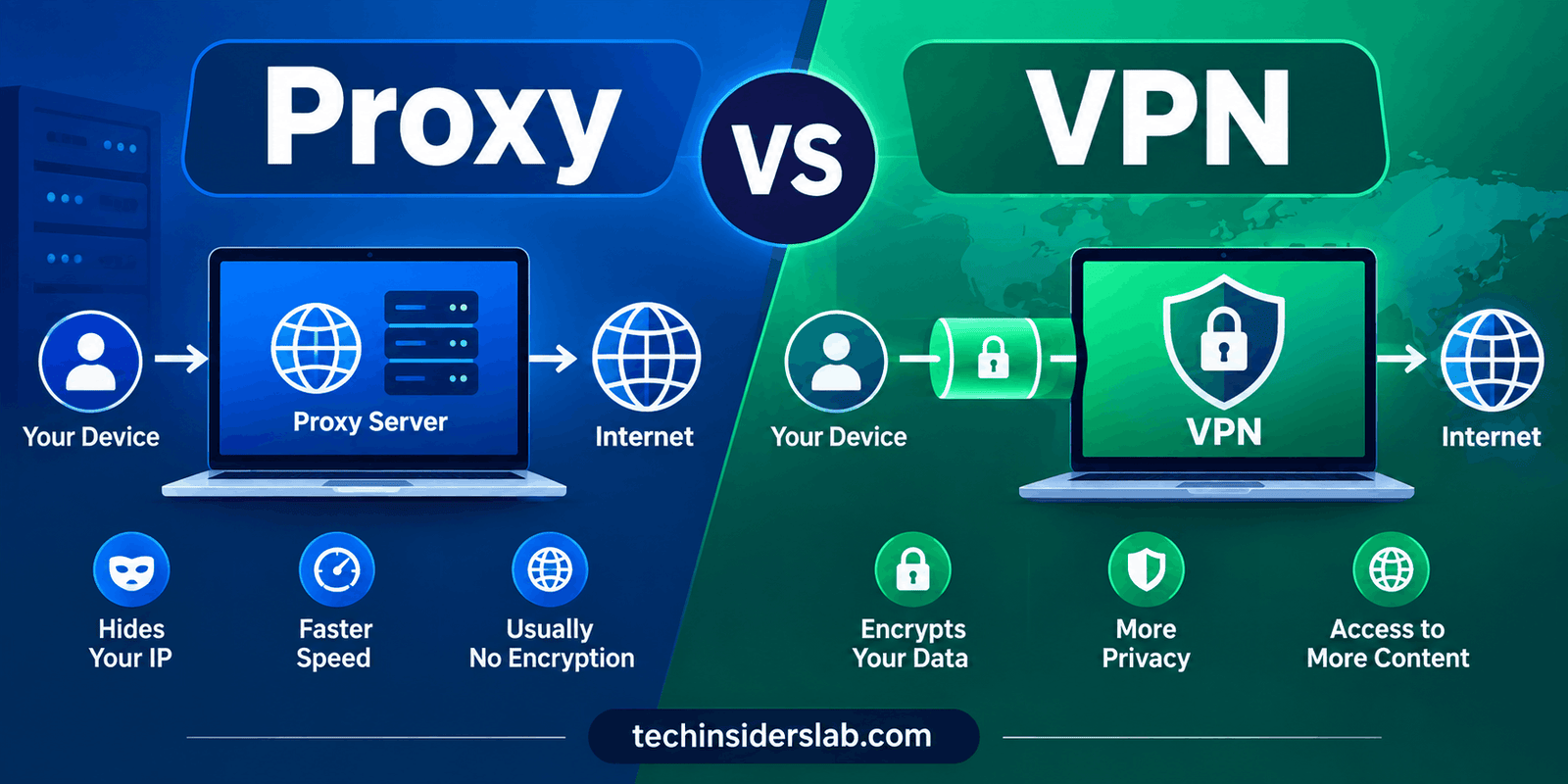
The main difference in the Proxy vs VPN comparison is that a traditional proxy primarily routes traffic through another server, while a VPN can route traffic through a VPN server and encrypt the connection between your device and that server. This makes VPNs more suitable when broader privacy and security are the priority.
But that does not mean proxies are useless. Proxies have important roles in web browsing, business networks, testing, traffic management, and other technical environments.
What Is a Proxy?
A proxy server works as an intermediary between a user and another server on the internet. Instead of your device communicating directly with a destination server, the request can first pass through the proxy.
The basic connection looks like this:
Your Device → Proxy Server → Website
When the proxy forwards your request, the destination website may see the proxy’s IP address instead of your original IP address.
This makes proxies useful for certain situations where users or organizations want to route traffic through another server. Proxies can also be used for traffic filtering, access management, caching, monitoring, and other network functions.
However, one important point should be remembered: a traditional proxy should not automatically be considered a security or encryption solution. Its primary function is traffic forwarding or intermediary communication rather than creating a complete encrypted tunnel.
AWS explains that forward proxies can anonymize outgoing traffic, while reverse proxies can handle incoming traffic and support functions such as traffic distribution and load balancing.
What Is a VPN?
VPN stands for Virtual Private Network. A VPN creates a protected connection between a device and a VPN server, with encryption used to secure the traffic traveling through the connection.
A simplified VPN connection looks like this:
Your Device → Encrypted VPN Connection → VPN Server → Internet
Instead of sending traffic directly to its destination, the device first sends it through the VPN connection. The VPN server then communicates with the wider internet.
One of the major advantages of a VPN is encryption. Properly configured VPN technology can make data traveling between the device and VPN server unreadable to unauthorized parties.
VPNs are also used by businesses to provide secure remote access to internal networks. Modern VPN deployments can include client-based VPNs for individual devices as well as site-to-site VPN connections between different networks.
Proxy vs VPN: What Is the Main Difference?
The easiest way to understand the difference is to focus on routing versus routing plus encryption.
A proxy primarily acts as an intermediary. It can forward requests and make the destination see the proxy’s IP address.
A VPN does more by creating an encrypted connection between the device and VPN server while also routing traffic through the VPN server.
Proxy vs VPN Comparison
| Feature | Proxy | VPN |
| Hides IP address | Usually | Yes |
| Encrypts device-to-server connection | Not normally | Yes |
| Traffic coverage | Often application-specific | Usually broader/device-level |
| Privacy protection | Limited | Stronger |
| Public Wi-Fi protection | Limited | Better suited |
| Common business uses | Filtering, caching, routing | Secure remote access |
| Performance impact | Often lower | Can vary |
| Suitable for sensitive traffic | Not generally by itself | More suitable |
| Setup | Often simple | Usually requires VPN software/configuration |
The exact behavior can vary depending on the type and configuration of the proxy or VPN. Therefore, these differences should be viewed as general characteristics rather than absolute rules.
How Does a Proxy Work?
When a user sends a request through a forward proxy, the request first reaches the proxy server. The proxy then forwards the request to the destination server.
The destination server communicates with the proxy rather than directly with the original client.
For example, without a proxy:
User → Website
With a proxy:
User → Proxy → Website
The proxy can therefore act as an intermediary that separates the client from the destination.
Businesses can also use reverse proxies. In that setup, the proxy sits in front of application servers and receives incoming requests before forwarding appropriate traffic to the underlying servers.
Reverse proxies can perform several functions, including traffic filtering, security controls, and load balancing.
How Does a VPN Work?
A VPN normally uses VPN client software or a compatible network configuration to establish a secure connection with a VPN server.
Once the connection is active, supported traffic is routed through the VPN tunnel.
The process can be simplified into three stages:
- Your device connects to the VPN server.
- The VPN encrypts supported traffic and sends it through the protected connection.
- The VPN server forwards the traffic toward the internet destination.
The destination website generally sees the VPN server’s IP address instead of the user’s original public IP address.
The encryption component is what makes a VPN significantly different from a traditional proxy. AWS describes VPN connections as encrypted tunnels that can protect data traveling between endpoints.
Is a Proxy or VPN Better for Privacy?
If privacy is the main concern, a reputable VPN will generally provide broader protection than a traditional proxy because encryption is an important part of the VPN connection.
However, using a VPN does not mean that a person becomes completely anonymous.
This is an important distinction. A VPN changes where some trust is placed. Instead of your internet provider being the only network intermediary, the VPN provider becomes an important party because your traffic passes through its infrastructure.
The Federal Trade Commission warns that users should research VPN applications carefully because some VPN apps may request extensive permissions, may not properly encrypt traffic, or may share information with third parties.
Therefore, VPN quality and provider trust matter just as much as the technology itself.
Proxy vs VPN for Public Wi-Fi
Public Wi-Fi is one of the strongest use cases for understanding the difference between a proxy and a VPN.
Networks in airports, hotels, cafés, libraries, and other public locations may not provide the same level of control or trust as a private network.
A properly configured VPN can encrypt traffic between your device and VPN server, reducing the ability of someone monitoring the local Wi-Fi connection to read that traffic.
The FTC specifically notes that an encrypted VPN connection can help protect data sent over insecure public Wi-Fi networks.
A traditional proxy does not generally provide equivalent protection for the entire connection.
For this reason, a VPN is normally the better choice when the goal is protecting sensitive internet traffic while connected to an untrusted network.
Proxy vs VPN for Streaming
Both proxies and VPNs can change the apparent source of an internet connection by routing traffic through another server.
This can sometimes be useful when services provide different content or functionality based on geographic location.
However, streaming platforms can detect and restrict some proxy and VPN addresses. Therefore, neither technology guarantees access to every region-restricted service.
There is also an important difference in coverage. A proxy may be configured for a particular browser or application, while a VPN can often route traffic from multiple applications through the VPN connection.
Users should also consider the terms and conditions of the streaming service they use.
Proxy vs VPN for Gaming
Gaming introduces a different set of considerations.
Some gamers use proxies or VPNs to change their network route or connect through another location. A VPN may also provide an additional layer of protection when gaming on an untrusted network.
However, routing traffic through an additional server can increase latency. For competitive games, high ping can affect responsiveness.
A proxy may sometimes have less overhead, but that does not mean it will always be faster. Server distance, network congestion, infrastructure quality, and the player’s own internet connection all influence performance.
Therefore, gamers should focus on latency, reliability, and server location rather than choosing a proxy or VPN simply because one is advertised as faster.
Proxy vs VPN for Business
Proxies and VPNs have different but sometimes complementary roles in business environments.
A company may use proxies to control employee web traffic, filter requests, cache content, manage access, or distribute incoming requests across multiple servers.
VPNs are commonly used when employees need secure remote access to internal company resources.
For example, a remote employee could connect to a company’s VPN and securely access internal applications that are not directly exposed to the public internet.
Businesses can also use site-to-site VPNs to connect separate offices or networks securely.
AWS identifies these different roles clearly: proxies can provide traffic anonymization, filtering, and distribution functions, while VPNs provide encrypted communication and secure network access.
Types of Proxies
Not every proxy is designed for the same purpose.
HTTP Proxy
An HTTP proxy is mainly designed around web traffic and can be configured for browser-based communication.
HTTPS Proxy
HTTPS proxies can work with secure web traffic, although the exact protection depends on how the connection is configured.
SOCKS Proxy
SOCKS proxies operate at a lower level than traditional HTTP proxies and can support different types of internet traffic.
Residential Proxy
Residential proxies use IP addresses associated with residential internet connections. They can be used for legitimate business purposes such as testing and market research.
Datacenter Proxy
Datacenter proxies originate from data-center infrastructure and are commonly used where speed and scalability are important.
Because proxies have different types and configurations, simply calling something a “proxy” does not tell you exactly how secure or capable it is.
Types of VPNs
VPNs also come in different forms.
Personal VPN
A personal VPN is generally designed for individual users who want to secure their internet connection or route traffic through another location.
Remote Access VPN
Remote access VPNs allow authorized users to connect to private organizational networks from outside the office.
Site-to-Site VPN
Site-to-site VPNs connect separate networks through encrypted connections and are commonly used by organizations with multiple locations.
These different implementations show that VPN technology is not limited to hiding an IP address. It can also be an important part of enterprise networking and remote-access infrastructure.
Is a VPN Completely Anonymous?
No.
This is one of the most common misconceptions about VPNs.
A VPN can hide your original IP address from websites and encrypt traffic between your device and the VPN server, but it cannot erase all identifying information from the internet.
For example, if you log into an account using your real email address, the website already knows who you are. A VPN does not change that.
The FTC also explains that VPN apps generally do not make users completely anonymous and that using a VPN shifts trust toward the VPN provider.
A VPN should therefore be considered a privacy and security tool, not a magic anonymity solution.
Are Free Proxies and Free VPNs Safe?
Free does not automatically mean unsafe, but users should be cautious.
Running servers, maintaining infrastructure, handling bandwidth, and providing technical support all cost money. A free service may use advertising, data collection, limited features, or other business models to cover those costs.
The FTC recommends researching VPN providers and reviewing their privacy practices before granting them access to internet traffic.
When choosing a VPN or proxy, users should examine:
- Privacy policies
- Data collection practices
- Security features
- Requested permissions
- Provider reputation
- Server availability
- Connection reliability
- Transparency about how the service operates
Avoid assuming that an app is trustworthy simply because it claims to provide privacy.
Which One Should You Choose?
The answer depends on your goal.
Choose a Proxy If:
- You need to route traffic for a particular application.
- You want to test a website from another IP address.
- You need specialized traffic routing.
- You are working with a non-sensitive task.
- Your main requirement is intermediary access rather than encryption.
Choose a VPN If:
- You want an encrypted internet connection.
- You regularly use public Wi-Fi.
- You want broader protection across your device.
- You need secure remote access to a private network.
- Privacy and security are your primary concerns.
For everyday users who specifically want stronger protection for their internet connection, a reputable VPN is generally the more comprehensive option.
Conclusion
Proxy and VPN services both help route internet traffic through another server, but they provide different levels of functionality and protection. A proxy is mainly useful for changing your visible IP address and routing traffic for specific applications, while a VPN adds encryption and can protect a broader range of internet traffic.
If you only need basic IP routing, a proxy may be sufficient. However, if privacy, security, and safer browsing on public Wi-Fi are your priorities, a reputable VPN is generally the better choice. Understanding the differences between a proxy and VPN can help you select the right option based on your specific needs.