Version Control Systems:Guide to Managing & Tracking Software
introduction
Software development becomes increasingly complicated as projects grow, teams expand, and new features are added. Developers may work on the same files at different times or simultaneously, making it difficult to know which version is correct. A small mistake can overwrite useful work, while an unexpected bug may require developers to return to an earlier version of the project.
This is where Version Control Systems (VCS) become essential. A version control system records changes made to files over time, allowing developers to track modifications, collaborate with teammates, compare different versions, and restore earlier states when necessary.
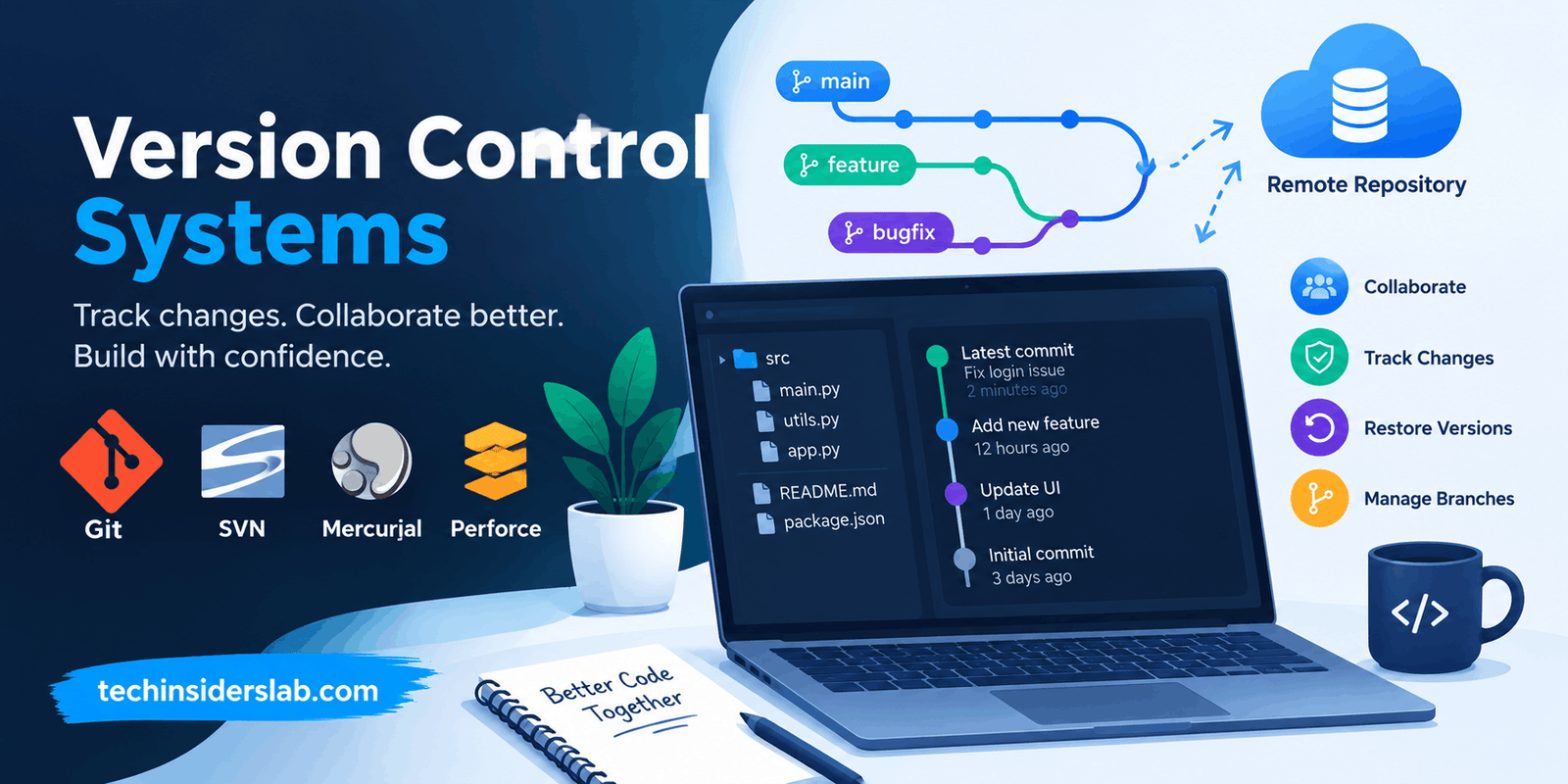
Today, version control is an important part of modern software development. Tools such as Git, Subversion, and Mercurial help individuals and teams maintain organized project histories while supporting safer development workflows.
What Are Version Control Systems?
A Version Control System is a software tool used to manage and track changes to files within a project. Although VCS technology is strongly associated with programming, it can also be useful for documentation, configuration files, websites, scripts, and other digital projects.
Instead of creating multiple files such as “project-final,” “project-final-2,” or “project-final-new,” developers can use version control to maintain a structured history of changes.
Each important change can be recorded with information such as:
- What was changed
- Who made the change
- When the change was made
- Why the change was made
- Which version came before it
- Which version came after it
This history makes it easier to understand how a project developed over time and helps teams investigate problems without losing previous work. Version control is also commonly described as source code management or revision control.
Why Is Version Control Important?
Without version control, managing a growing software project can become difficult very quickly. Imagine a team of five developers working on the same application. Each person may modify different parts of the code, and eventually those changes need to be combined.
Without a proper system, developers could accidentally overwrite one another’s work or lose track of which code is the latest.
Version control addresses these problems by creating a reliable history of the project.
One major advantage is the ability to investigate bugs. If a newly introduced feature causes an unexpected problem, developers can examine previous versions and determine when the problematic change was introduced.
Version control also makes collaboration easier. Developers can work on separate areas of a project and later combine their changes using controlled merging processes.
Another important advantage is accountability. Because changes can be associated with contributors and commit messages, teams can better understand the purpose and origin of modifications.
How Do Version Control Systems Work?
Although different VCS platforms use different commands and terminology, the general concept is similar.
A developer begins with a project repository. The repository contains the files and information needed to maintain the project’s version history.
When the developer makes changes, the VCS can identify those modifications. The developer can then record the changes in a commit or similar revision.
A simplified workflow looks like this:
- Create or obtain a repository.
- Make changes to project files.
- Review the changes.
- Record the changes as a commit.
- Share changes with other contributors when necessary.
- Merge compatible work.
- Continue developing new versions.
This approach creates a timeline of the project rather than leaving developers with disconnected copies of files.
Modern distributed systems such as Git can keep the complete repository history locally, allowing many operations to happen without contacting a remote server.
Centralized vs. Distributed Version Control
Version Control Systems are generally divided into two major categories: Centralized Version Control Systems (CVCS) and Distributed Version Control Systems (DVCS).
Centralized Version Control
In a centralized system, the project has a central repository that stores the main version history. Developers generally obtain working copies from that central repository and send their changes back to it.
Subversion (SVN), CVS, and Perforce are examples associated with centralized version control.
The centralized model can be straightforward because everyone works around a common server. However, the central repository can become an important dependency for everyday operations.
A simplified centralized workflow is:
Central Repository → Developer → Changes → Central Repository
This model has been used successfully by many organizations, particularly for projects where centralized administration and access control are important.
Distributed Version Control
Distributed Version Control Systems take a different approach. Each developer can have a complete copy of the repository, including its history.
Git and Mercurial are well-known examples of distributed version control systems.
Because the repository exists locally, developers can perform many operations without an active connection to a central server. They can create commits, inspect history, compare changes, and work with branches locally.
A remote repository can still be used for collaboration. The difference is that the central server is not necessarily the only place where the project’s history exists.
Git and the Modern Version Control Landscape
Among modern version control tools, Git has become especially influential. Git is an open-source distributed version control system originally created by Linus Torvalds in 2005. It is widely used across open-source and commercial software development.
Git provides developers with powerful features for branching, merging, comparing changes, reviewing history, and collaborating through remote repositories.
A typical Git workflow can include:
- Creating or cloning a repository
- Editing project files
- Reviewing modifications
- Creating commits
- Creating branches
- Pushing changes
- Pulling updates
- Opening pull requests
- Reviewing code
- Merging approved changes
This workflow allows developers to isolate new features or fixes before integrating them into the main codebase.
What Is a Repository?
A repository is the central concept behind many version control systems.
It can be thought of as a managed project space containing files and version history. In a distributed system such as Git, a developer’s local repository can contain the complete history of the project.
Repositories can be stored locally on a computer or hosted on a remote service for team collaboration.
A repository provides developers with a structured way to understand how a project has changed rather than simply storing the latest copy of its files.
What Is a Commit?
A commit represents a recorded set of changes.
For example, a developer might fix a login problem and create a commit describing that correction. Later, another developer can examine the project’s history and understand what changed.
Good commit messages are useful because they provide context. Instead of simply saying “update,” a developer might describe the actual purpose of the modification.
Over time, many commits create a detailed project timeline.
This timeline can help developers identify when a feature was introduced, investigate bugs, and understand decisions made during development.
Branching in Version Control
Branching is one of the most useful concepts in modern version control.
A branch allows developers to work on a separate line of development without immediately changing the main project branch.
For example, a developer might create a branch for:
- A new login feature
- A security improvement
- A bug fix
- A redesigned interface
- An experimental feature
The developer can work independently and record multiple commits on that branch.
Once the work is ready, it can be reviewed and merged into the appropriate branch.
Git’s branching model is particularly flexible, and branches can be created and merged efficiently.
Merging Changes
After developers work on separate branches, their changes may need to be combined.
This process is called merging.
For example, one developer might create a payment feature while another fixes an account settings issue. If both changes are developed independently, version control can help combine their work into a shared branch.
Sometimes changes affect the same lines of a file. This creates a merge conflict.
A conflict does not necessarily mean that work has been lost. Instead, developers need to review the conflicting changes and decide which version, or combination of versions, should remain.
Good branching and review practices can make this process more manageable.
Version Control and Team Collaboration
One of the biggest reasons organizations use VCS is collaboration.
Modern development teams may include people working from different offices, cities, or countries. Developers need a reliable way to share code while maintaining a consistent project history.
Distributed version control is particularly useful in this environment because contributors can work independently and synchronize changes when appropriate. Git’s local repository model allows developers to perform many tasks without depending on a constant network connection.
Teams can also use code review workflows. A developer can create a branch, make changes, and submit those changes for review before they become part of the main codebase.
This creates an additional quality-control layer.
Version Control in Open-Source Projects
Version control is also fundamental to open-source software.
Open-source projects may receive contributions from developers who have never met and may live in completely different parts of the world.
A distributed system makes it possible for contributors to create branches, develop changes independently, and submit those changes for review.
Maintainers can then evaluate the proposed work before integrating it into the main project.
This process provides structure to projects that may involve hundreds or thousands of contributors.
Benefits of Version Control Systems
There are many practical advantages to using version control.
1. Complete Project History
A VCS maintains a record of project changes, making it easier to understand how files evolved.
2. Safer Experimentation
Developers can create branches and test ideas without immediately affecting the main version.
3. Easier Bug Investigation
Teams can compare versions and examine historical changes to determine when problems were introduced.
4. Better Collaboration
Multiple developers can work on different parts of a project and combine their work through controlled workflows.
5. Recovery From Mistakes
If an incorrect modification is introduced, previous versions can help developers restore or reconstruct working code.
6. Improved Accountability
Commit histories can show who made changes and provide context through commit messages.
7. Flexible Development Workflows
Teams can choose different branching and collaboration models depending on project size and organizational needs.
These benefits make version control valuable for both individual developers and large engineering teams.
Popular Version Control Systems
Several version control systems have been used throughout the history of software development.
Git
Git is a distributed, open-source VCS and is one of the most widely used systems today.
Subversion
Subversion, commonly called SVN, is a centralized version control system that has been used extensively in software development.
Mercurial
Mercurial is a distributed version control system designed to support collaborative development.
Perforce
Perforce is associated with centralized version control and is used in environments where managing large development projects and specialized assets can be important.
The right choice depends on the project’s requirements, team structure, existing infrastructure, and workflow.
Version Control for Individual Developers
Version control is not only useful for large teams.
Individual developers can benefit from it as well.
A solo developer may work on a website, mobile application, automation script, or personal project. Without version control, it can be difficult to remember what changed between different versions.
A repository provides a structured history and allows the developer to experiment more safely.
For beginners, learning basic concepts such as repositories, commits, branches, merges, and remote repositories can provide a strong foundation for professional software development.
Version Control and DevOps
Version control is closely connected to modern DevOps practices.
Development teams frequently connect source repositories with automated build, testing, and deployment systems.
When a developer pushes a change, automated tools can detect the update and perform tasks such as:
- Building the application
- Running automated tests
- Checking code quality
- Creating deployment packages
- Deploying approved versions
This creates a connection between code changes and software delivery.
Version control therefore becomes more than a backup mechanism. It can serve as an important source of information for automated development and deployment workflows.
Challenges of Version Control Systems
Although VCS provides significant benefits, learning and managing it can have challenges.
Beginners may find terminology such as commit, branch, merge, rebase, clone, pull, and push confusing at first.
Distributed systems can also require developers to understand both local and remote repositories.
Large repositories can present additional challenges, especially when they contain large binary assets or extremely long histories. Distributed systems may require every developer to maintain significant repository data locally.
Another challenge is poor workflow design. A powerful version control tool cannot automatically solve organizational problems. Teams still need sensible branching policies, review procedures, commit practices, and access controls.
Best Practices for Using Version Control
A few simple habits can make version control much more effective.
Commit meaningful changes: Avoid creating confusing commits that contain unrelated modifications.
Write clear commit messages: Describe what the change actually accomplishes.
Use branches thoughtfully: Keep experimental features and significant fixes isolated when appropriate.
Review changes before merging: Code review can catch problems before they reach the main branch.
Keep repositories organized: Avoid unnecessary files and generated content when they do not belong in source control.
Pull or synchronize regularly: Staying reasonably current can reduce difficult conflicts later.
Protect important repositories: Use suitable access controls and backup strategies for important projects.
Do not treat version control as a replacement for every kind of backup: Repository history is valuable, but organizations may still need separate backup and disaster-recovery plans.
What Makes a Good Version Control Workflow?
There is no single workflow that is perfect for every development team.
A small team may prefer a simple approach where developers create short-lived branches and merge changes into a main branch.
A larger organization may require additional review stages, automated testing, release branches, and deployment controls.
The most effective workflow is usually one that matches the team’s size, technical requirements, release process, and communication style.
A workflow should make development safer rather than adding unnecessary complexity.
The Future of Version Control
Version control continues to evolve alongside software development.
Modern engineering teams increasingly work with cloud-hosted repositories, automated testing, continuous integration, continuous delivery, code review systems, and AI-assisted development tools.
As software projects become more complex, maintaining a reliable history of changes becomes even more important.
The fundamental idea remains simple: developers need a trustworthy way to record, understand, share, and manage changes.
Whether a developer works alone or as part of a global engineering organization, version control provides the foundation for maintaining that history.
Conclusion
Version Control Systems are an essential part of modern software development. They help developers track changes, maintain project history, collaborate with teammates, experiment safely, investigate bugs, and recover from mistakes.
Centralized systems such as SVN and distributed systems such as Git and Mercurial represent different approaches to managing project history. Distributed version control has become particularly important because it allows developers to maintain complete repositories locally while still supporting collaborative remote workflows.
For anyone learning software development, understanding concepts such as repositories, commits, branches, merges, and code review is an important step toward professional development practices.
Ultimately, version control is not simply about saving older versions of files. It is about creating a reliable history of development that allows people and teams to build software with greater confidence, organization, and control.