What Is a Webhook? A Complete Guide to How Webhooks Work
introduction
In modern software development, different applications often need to communicate with each other automatically. A payment system may need to tell an online store that a payment has been completed. A Git repository may need to notify a deployment system when new code is pushed. A form application may need to send new customer information to a CRM.
This type of communication can be handled in several ways, and one of the most useful methods is a webhook.
A webhook allows one application to automatically send information to another application when a specific event happens. Instead of repeatedly asking whether something has changed, the receiving system can wait for an incoming notification. This makes webhooks an important part of APIs, automation, SaaS platforms, payment systems, developer tools, and modern integrations.
What Is a Webhook?
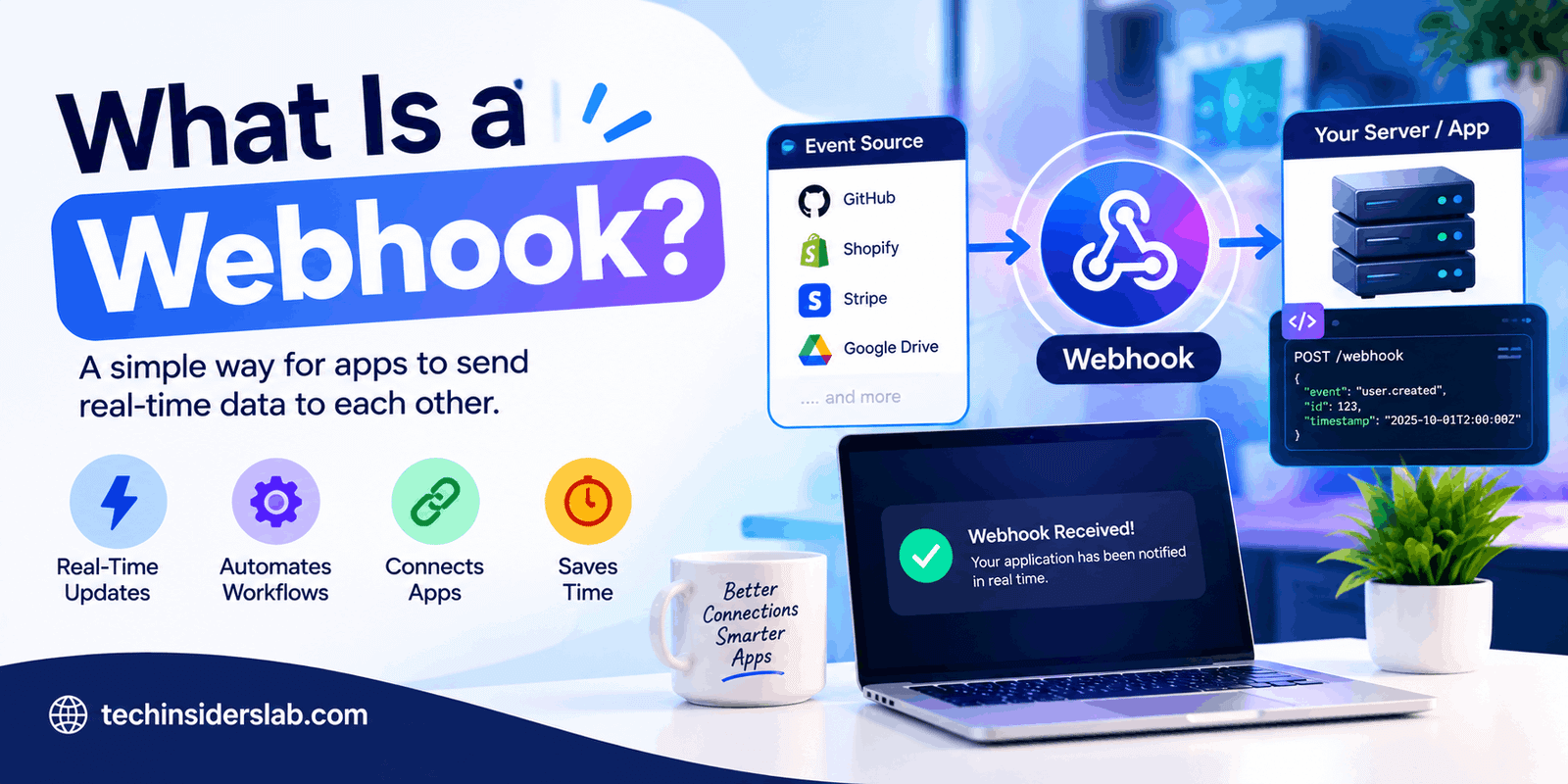
A webhook is an automated HTTP request sent from one application to another when a particular event occurs.
In simple words, a webhook works like an automatic notification between software systems.
For example, imagine that you have an online store connected to a payment service. When a customer successfully pays for an order, the payment service can send a webhook to your website. Your website receives the notification and can automatically mark the order as paid.
The basic process looks like this:
Event happens → Webhook sends data → Your server receives it → Your application takes action
Webhooks are commonly delivered through HTTP requests, often using the POST method, with event information included in the request body.
How Does a Webhook Work?
The concept behind webhooks is relatively simple.
First, the receiving application creates a special URL called a webhook endpoint. This URL is designed to accept incoming requests.
Next, the sending application is configured to monitor one or more events. When one of those events happens, it sends an HTTP request to the webhook URL.
The receiving server examines the request and determines what action should be performed.
For example:
- A customer completes a payment.
- The payment platform detects the successful payment.
- The platform creates an event containing relevant information.
- It sends that event to your webhook URL.
- Your server receives the request.
- Your application verifies the request.
- Your application processes the event.
- The customer’s order is updated.
This approach allows applications to react to events without constantly checking another service for updates.
Webhook Example
Suppose you run an e-commerce website and use an external payment provider.
Without a webhook, your website might repeatedly ask the payment provider:
“Has this payment been completed?”
Then it may ask again a few seconds later.
This approach is known as polling.
With a webhook, the payment provider can automatically tell your website:
“Payment completed.”
Your website can then update the order, send a confirmation email, start fulfillment, or perform another automated task.
This event-based approach can reduce unnecessary API requests and provide near real-time notifications. GitHub, for example, describes webhooks as a way to receive data as events happen rather than repeatedly polling an API.
Webhook vs API
Webhooks and APIs are closely related, but they solve different communication problems.
An API generally allows your application to request information or perform an action.
A webhook allows another application to push information to your application when an event occurs.
Consider a weather application.
With an API, your application might ask:
“What is the current weather?”
With a webhook-style event system, another service could notify your application when a specific event occurs.
A simple way to remember the difference is:
API: You ask for information.
Webhook: You receive a notification when something happens.
This distinction becomes especially important when applications need to respond quickly to events without wasting resources on repeated requests.
What Is a Webhook Endpoint?
A webhook endpoint is the URL that receives webhook requests.
For example, an application might have an endpoint such as:
https://example.com/api/webhook
When an event occurs, the external service sends information to that address.
The endpoint is normally handled by server-side code. That code receives the incoming request, validates it, reads the event data, and performs the appropriate action.
A good webhook endpoint should be designed specifically for incoming events rather than treated like an ordinary webpage.
What Information Does a Webhook Send?
A webhook usually sends an event payload containing information about what happened.
The exact structure depends on the service sending the webhook.
A simplified JSON payload could look like this:
{
“event”: “payment_completed”,
“order_id”: “12345”,
“amount”: 49.99,
“status”: “paid”
}
The receiving application can read this information and decide what to do.
Real webhook payloads can contain considerably more information, including event identifiers, timestamps, customer information, resource IDs, event types, and other metadata.
Because webhook formats vary between platforms, developers should always check the documentation of the service they are integrating.
Common Uses of Webhooks
Webhooks are used in many areas of software development and online business.
1. Payment Notifications
Payment platforms can use webhooks to notify websites when payments succeed, fail, or change status.
For example, a successful payment could trigger:
- Order confirmation
- Inventory updates
- Receipt generation
- Subscription activation
- Account upgrades
This is one of the most important uses because payment-related events often need reliable server-to-server communication.
2. Git and Development Automation
Development platforms can send webhooks when developers push code, open pull requests, create releases, or perform other repository actions.
A webhook can then trigger:
- Automated testing
- Deployment
- Build processes
- Notifications
- Issue tracking updates
GitHub specifically supports webhooks for reacting to repository and other supported events, including triggering external CI systems and deployment workflows.
3. Notifications
Webhooks can connect applications with communication platforms.
For example, a new event in one application could automatically generate a message in a team communication system.
This can be useful for:
- New orders
- System alerts
- New support tickets
- Deployment notifications
- Customer activity
4. CRM and Marketing Automation
When someone submits a form, signs up for a service, or becomes a customer, a webhook can send the information to another system.
The receiving system might create a new customer record, start an email campaign, assign a sales representative, or trigger another workflow.
5. Subscription Management
Webhooks are particularly useful for subscription-based applications.
A service can notify your application when a subscription is:
- Created
- Renewed
- Canceled
- Paused
- Expired
- Updated
Your application can then update the user’s account automatically.
Why Are Webhooks Important?
One of the biggest advantages of webhooks is that they support event-driven automation.
Instead of repeatedly checking another service, your application can wait for relevant events.
This can provide several benefits.
Near Real-Time Updates
Webhooks can deliver information shortly after an event occurs, making them useful for applications that need timely updates.
Reduced API Requests
Polling can require repeated API requests even when nothing has changed. Webhooks can reduce this unnecessary activity by sending information only when subscribed events occur.
Automation
Webhooks allow one event to trigger another process automatically.
For example:
New order → Webhook → Inventory update → Email notification
Better Scalability
For systems monitoring many resources, webhook-based event delivery can be more efficient than constantly checking each resource individually.
Webhook Security
Security is one of the most important parts of working with webhooks.
Because a webhook endpoint can receive requests from outside your application, you should not automatically trust every incoming request.
Many webhook providers use a secret or digital signature to help verify that a request really came from the expected service.
For example, GitHub uses a webhook secret to generate a signature that the receiving application can validate.
Important security practices include:
- Use HTTPS.
- Verify webhook signatures.
- Keep webhook secrets private.
- Never place secrets directly in public source code.
- Validate the event type.
- Validate the incoming data.
- Consider IP restrictions when supported.
- Protect against replayed events.
- Log important webhook activity securely.
GitHub also recommends using HTTPS, webhook secrets, event validation, and unique delivery identifiers as part of a secure webhook implementation.
Why Webhook Verification Matters
Imagine that your website receives a request saying:
“Payment completed.”
If your application simply trusts that message, someone could potentially send a fake request to your webhook endpoint and convince your system that a payment occurred.
That could create serious problems.
For example, an attacker might attempt to trigger:
- Fake order fulfillment
- Unauthorized account upgrades
- Incorrect database updates
- Fraudulent subscription changes
This is why webhook verification is essential.
A secure application should verify the request before performing sensitive actions.
Handling Failed Webhooks
Webhook delivery is not guaranteed to succeed every time.
The receiving server could be unavailable, overloaded, incorrectly configured, or temporarily unable to process the request.
For this reason, reliable webhook systems should consider failed deliveries and retry strategies.
It is also important to make webhook processing idempotent.
In simple terms, this means that if the same event is received more than once, your application should not accidentally perform the same action multiple times.
For example, if a payment webhook arrives twice, your application should not create two orders or charge the customer twice.
Some platforms provide delivery IDs or event IDs that can help developers detect duplicate deliveries. GitHub, for example, recommends using its delivery identifier when handling webhook events.
Webhook Performance
A webhook endpoint should generally respond quickly.
Long-running tasks should not necessarily be performed before acknowledging the incoming request. Instead, an application can accept the event, place it into a queue, return a successful response, and process the task separately.
This design can make the webhook system more reliable and prevent slow operations from causing delivery failures.
GitHub recommends responding within its delivery time limit and suggests asynchronous processing through a queue when longer work is required.
Common Webhook Mistakes
Beginners often make several mistakes when implementing webhooks.
Trusting Every Request
An endpoint should not assume that every incoming request is legitimate.
Ignoring Duplicate Events
The same event may sometimes be delivered more than once, so applications should be designed to handle duplicates safely.
Processing Everything Synchronously
Heavy processing inside the webhook request can lead to slow responses and failed deliveries.
Storing Secrets in Code
Webhook secrets should be stored securely rather than hardcoded into publicly accessible code.
Subscribing to Unnecessary Events
Receiving events that your application does not need increases processing and management overhead. GitHub recommends subscribing only to the events that are actually required.
Not Logging Events
Without useful logs, debugging webhook failures can become difficult.
A good system should record enough information to understand when an event arrived, what type it was, whether validation succeeded, and how processing ended.
How to Start Using Webhooks
If you are a beginner, you do not need to build a complicated webhook architecture immediately.
A typical starting process looks like this:
Step 1: Choose the service you want to integrate.
Step 2: Check whether it supports webhooks.
Step 3: Create a webhook endpoint on your server.
Step 4: Select the events you want to receive.
Step 5: Configure the webhook URL.
Step 6: Add a secret and implement signature verification if supported.
Step 7: Test the webhook using test events.
Step 8: Process the incoming data.
Step 9: Return an appropriate HTTP response quickly.
Step 10: Add logging, duplicate protection, error handling, and monitoring.
Many platforms provide a dashboard where developers can create a webhook, enter the payload URL, select events, and optionally configure a secret.
Webhooks in Modern Automation
Webhooks have become especially valuable as businesses use more SaaS applications and automation platforms.
A single workflow may involve a website, payment service, CRM, email platform, analytics system, database, and communication tool.
Webhooks can connect these systems together.
For example:
Customer places order → Payment confirmed → Webhook received → CRM updated → Inventory changed → Confirmation sent
Without automated event-based communication, many of these processes would require manual work or constant API polling.
Webhooks therefore act as an important communication layer between modern applications.
Are Webhooks the Same as WebSockets?
No.
Although the names sound similar, webhooks and WebSockets are different technologies.
A webhook is typically an HTTP request sent from one service to another when an event happens.
WebSockets create a persistent communication connection that can support real-time, two-way communication between a client and server.
Webhooks are commonly used for service-to-service event notifications, while WebSockets are often used for interactive real-time applications such as chat, live dashboards, and multiplayer experiences.
Conclusion
Webhooks are an important technology for connecting modern applications and automating tasks. They allow one system to automatically send event information to another without constant polling. From payment confirmations and e-commerce orders to software deployments and notifications, webhooks make integrations faster and more efficient. With proper security, validation, error handling, and duplicate-event protection, webhooks can provide a reliable foundation for building automated and connected digital systems.